Home
Your voice at a glance
Words this week, your speaking speed, time saved compared with typing, and a heatmap of your rhythm. Today’s dictations sit right below, each with a Copy button.

Hold a key on your Mac or tap once on your iPhone and just talk. Tiho turns it into finished text in whatever app you’re using, and keeps what you said in a journal you can come back to.
You said um, let’s move the demo to Wednesday, no, Thursday at three…
See Tiho in 38 seconds. Hold a key on your Mac, talk like a person, and watch the words land. Then find them again on your iPhone.
Dictation helps you write faster. Tiho helps you write faster and remember what you said.
Every dictation, note and conversation lands in one place: a day page, a summary with tasks, the original audio.
Works in any app with a text field: Mail, Slack, Notes, your code editor, the browser. There is no window to switch to.
The pill appears at the bottom of the screen and listens. Your words stream in live while you speak.
Say “um”, change your mind mid-sentence, correct yourself. Tiho drops the filler and keeps what you meant.
Finished text lands where your cursor is. If the field changed meanwhile, the text waits in the pill with a Copy button, so nothing is lost.
Need your hands? Double-tap ⌥⌥ for hands-free, then tap once more to finish.
Words this week, your speaking speed, time saved compared with typing, and a heatmap of your rhythm. Today’s dictations sit right below, each with a Copy button.
Every dictation keeps what you actually said. Flip to Said → became to see the word diff.
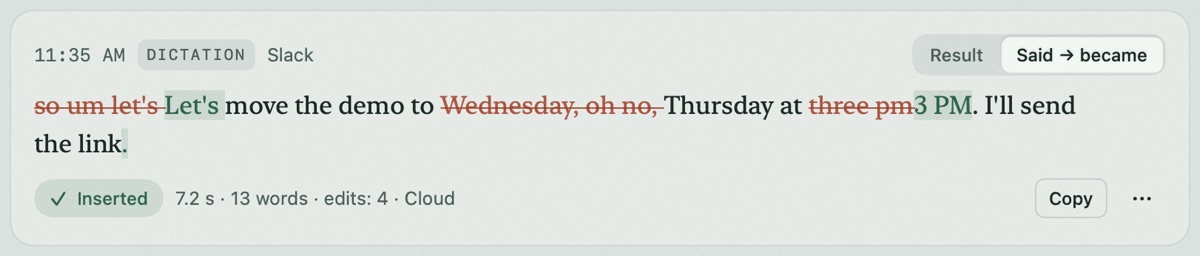
so um let’s Let’s move the demo to Wednesday, oh no, Thursday at three pm3 PM. I’ll send the link.
Select text, hold ⌥ and say “make it shorter and more businesslike”. Review the word diff, then Replace.

Select text in any app and press ⌃⌘T. Replace it, or copy the translation.

Fix a name once after dictating and Tiho remembers the spelling next time. Edit or remove any pair.
Short spoken triggers expand into text you type all the time.
Tiho opens straight to the record button. Say what’s on your mind; later you’ll find a day page, a summary with tasks, and the original audio.


The Tiho keyboard adds a dictation strip on iPhone: speak, translate, or edit the selected text by voice.
The Live Activity and Dynamic Island keep the timer visible while you switch to something else.
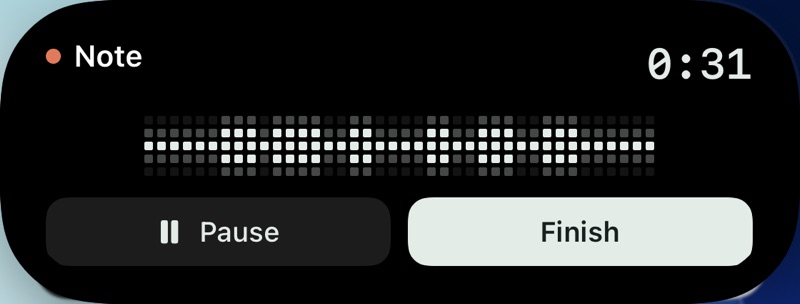
Start a note on Apple Watch and find it in the same journal. The watch companion is in device testing.
Transcription and formatting use cloud processing only after you allow it in the app. Mood reflections are a separate, optional switch.
You start and stop every recording. The pill or the record screen always shows when Tiho is listening.
Recordings are kept with your notes so you can replay or re-transcribe them. If processing fails, the audio is saved for a retry.
Remove a recording, export your notes, or delete your account from the app. A deleted account can be restored for 30 days; after that, or at once if you ask, your notes, audio and usage records are erased from the server.
Resets every Monday at 00:00 UTC.
Billed monthly. Cancel anytime.
Billed monthly. Cancel anytime.
Tiho Pro for everyone on the team, managed in one place. The price depends on the size of the team, so we agree on it together.
From 5 people. Per person it costs less than Tiho Pro bought one by one.
Prices in US dollars. Subscribe in the app or on your account page. Subscriptions renew automatically until cancelled; access continues to the end of the paid period. Paid plans don’t promise unlimited processing. See the terms.
You get 2,000 transcribed words each week, shared across all your devices, keyboard dictation, notes and interviews. The allowance resets on Monday at 00:00 UTC; unused words don’t roll over. Summaries and translations don’t count the same words again. Free recordings can be up to 30 minutes.
When the words run out, cloud transcription pauses until the reset or until you subscribe. Your saved audio stays available. No card and no automatic charge on the free plan.
Dictation (the hotkey on your Mac and the iPhone keyboard) is practically unlimited on both plans, with a fair-use ceiling of 1,000 minutes a month (about 120,000 words). Notes, thoughts, interviews and calls use recording minutes: 120 a month on Tiho, 600 on Tiho Pro. Minutes renew on the 1st (UTC). A question to your journal uses one credit, not words or minutes: 300 credits a month on Tiho, 1,500 on Tiho Pro and 20 a week on the free plan.
No. You explicitly start and stop recording. Tiho asks for microphone permission, and the pill on Mac or the record screen on iPhone shows whenever it is listening.
It transcribes your voice, removes filler words and self-corrections, and formats the result. On iPhone it helps organise your notes into a day page and summarises conversations: decisions, tasks and open questions. You can edit everything, and the original recordings stay available.
Tiho for Mac needs macOS 15 or newer and runs on Apple Silicon and Intel Macs. Tiho for iPhone needs iOS 17 or newer. The Apple Watch companion is in device testing.
The apps are available in English, Russian, Spanish and Polish, and you can dictate in any of these languages.
Yes. Sign in with the same account and your words, journal and weekly allowance are shared. Tiho for Mac is available to download; the iPhone app is currently in closed testing, so request an invitation below.
Only when you allow cloud processing does Tiho send audio and text for transcription and formatting through its server. The privacy notice explains what is stored, for how long, and how to delete it.
Start with 2,000 free words every week. Your account works on every device.
Hold right ⌥, speak, release. Finished text appears in the app you are using.
Request the Mac betaPublic download is being prepared with verified signing. Beta invitations include installation instructions.
Quick voice notes, interviews and a daily journal, with saved audio and transcripts. Includes the Tiho keyboard.
Request an invitationApple Watch: companion in device testing. Not yet available as a public download.